Hi Rob,
Sorry, but yesterday night I've cursed you until the 3rd generation !
I'm pretty sure it is not a stardraw problem but I can blame no one else unfortunately.
Over the last few weeks I have been designing about 50 panels to the highest possible standard using all the nice alignment features you introduced me to at ISE.
In the particular case visible here below, "ETHERNET 1" is the text attached to the LAN connector arrange over two lines.
Note that this can only be achieved by unlocking the part and edit the text, the double click way doesn't allow to create a second line (at least not using the "ENTER" key which sounds like the right way anyway).
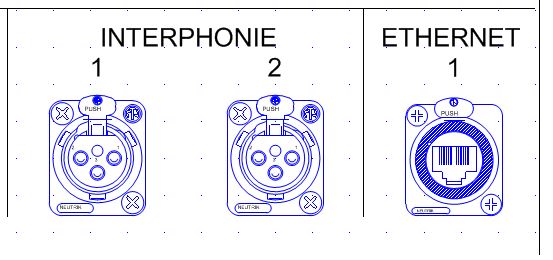
As I mention this I would have also loved to see the text to be aligned on the bottom of the text box. If so the creation of the second line would shift the first one above and keep the second at the normal level rather than on the part as visible here below:
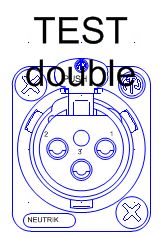
That imposed me to move all the text up, and then down, you'll see why below.
Now since INTERPHONIE is common to 1 and 2, it has been insert in a text box centered between 1 and 2 and aligned to the word ETHERNET using temporary lines (in the absence of the cross hair feature.
Talking about this, I noticed a unit mistakes with the text, the default text size of an XLR is announced in the properties frame at 0.26 mm, this shout be cm or 2.6mm I believe.
Note that the mistake in the unit is replicated if after you unlock the part you copy and paste the text elsewhere, however if you create a text using the text feature the right dimension is being displayed. They might be an explanation for that, but it is weird.
Now that all my drawings are done, I'm obviously willing to print this full size, scale 1:1, shall I extend or you keep in mind that this feature along with the area to be printed feature should be on your emergency list ?
As we know, there is a solution for that....autocad transfer...
Yeah great, this is what I get:
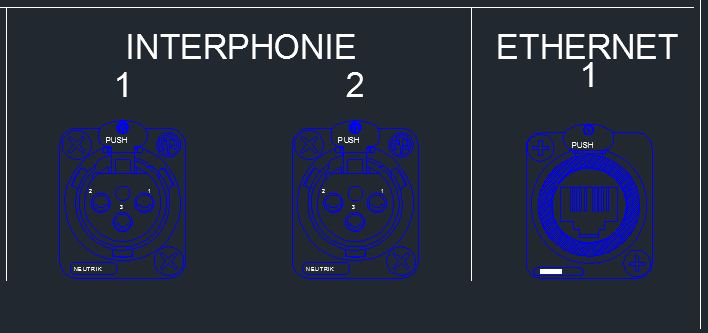
The problem is obvious, Autocad is not using the same spacing between lines. This means that I had to go back to my 50 panels, explode the ETHERNET 1 text box into ETHERNET and 1, re-align all the 1 to the other numbers, align the ETHERNET to interphonie and re export. And of course ETHERNET 1 is an extract of the panel, there is up to 8 occurrences of the issue on each panel, grrrrr!!!!!
One of the solution could have been to modify the spacing between the 2 lines in autocad, but as you know this text is embedded into the part, so you have to explode all the parts and I'm far from being an autocad specialist which is the reason I use Stardraw ;-)
Last thing, don't forget to add the edition of the text of a part into the undo list, this must have generated a hundred of F word over the night!
Thanks
Christian
Christian Delvaux
Back in Belgium !