Line spacing problem with Autocad


Author
Message
chrisccs
chrisccs
Supreme Being (10K reputation)Supreme Being (10K reputation)Supreme Being (10K reputation)Supreme Being (10K reputation)Supreme Being (10K reputation)Supreme Being (10K reputation)Supreme Being (10K reputation)Supreme Being (10K reputation)Supreme Being (10K reputation)
Group: Forum Members
Posts: 48, Visits: 181
Hi Rob,

Sorry, but yesterday night I've cursed you until the 3rd generation !

I'm pretty sure it is not a stardraw problem but I can blame no one else unfortunately.

Over the last few weeks I have been designing about 50 panels to the highest possible standard using all the nice alignment features you introduced me to at ISE.

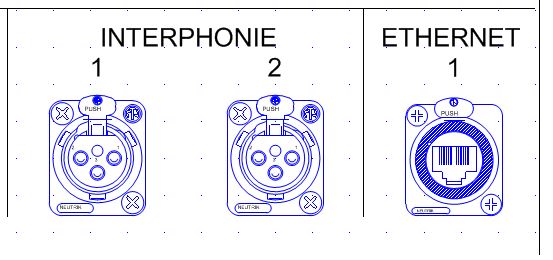
In the particular case visible here below, "ETHERNET 1" is the text attached to the LAN connector arrange over two lines.
Note that this can only be achieved by unlocking the part and edit the text, the double click way doesn't allow to create a second line (at least not using the "ENTER" key which sounds like the right way anyway).
http://forums.stardraw.com/Uploads/Images/f885e3ad-6744-4d12-986c-e9ac.JPG

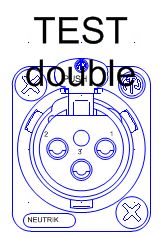
As I mention this I would have also loved to see the text to be aligned on the bottom of the text box. If so the creation of the second line would shift the first one above and keep the second at the normal level rather than on the part as visible here below:

http://forums.stardraw.com/Uploads/Images/6e7aaf76-2dbe-451d-814d-9629.JPG


That imposed me to move all the text up, and then down, you'll see why below.

Now since INTERPHONIE is common to 1 and 2, it has been insert in a text box centered between 1 and 2 and aligned to the word ETHERNET using temporary lines (in the absence of the cross hair feature.

Talking about this, I noticed a unit mistakes with the text, the default text size of an XLR is announced in the properties frame at 0.26 mm, this shout be cm or 2.6mm I believe.
Note that the mistake in the unit is replicated if after you unlock the part you copy and paste the text elsewhere, however if you create a text using the text feature the right dimension is being displayed. They might be an explanation for that, but it is weird.


Now that all my drawings are done, I'm obviously willing to print this full size, scale 1:1, shall I extend or you keep in mind that this feature along with the area to be printed feature should be on your emergency list ?

As we know, there is a solution for that....autocad transfer...

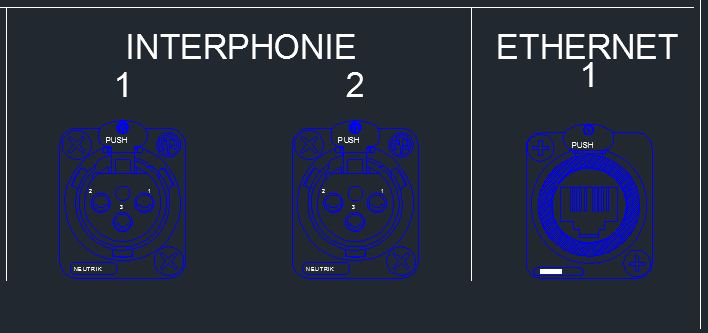
Yeah great, this is what I get:


http://forums.stardraw.com/Uploads/Images/bb2f5ec4-68bc-4f05-897f-08db.JPG


The problem is obvious, Autocad is not using the same spacing between lines. This means that I had to go back to my 50 panels, explode the ETHERNET 1 text box into ETHERNET and 1, re-align all the 1 to the other numbers, align the ETHERNET to interphonie and re export. And of course ETHERNET 1 is an extract of the panel, there is up to 8 occurrences of the issue on each panel, grrrrr!!!!!

One of the solution could have been to modify the spacing between the 2 lines in autocad, but as you know this text is embedded into the part, so you have to explode all the parts and I'm far from being an autocad specialist which is the reason I use Stardraw ;-)

Last thing, don't forget to add the edition of the text of a part into the undo list, this must have generated a hundred of F word over the night!

Thanks

Christian

Christian Delvaux

Back in Belgium !
Rob Robinson
Rob Robinson
Forum Administrator (392K reputation)
Group: Administrators
Posts: 2.3K, Visits: 9.1K
Hi Chris,

I'm afraid that I don't have a simple solution for you.

The engraving on connectors is designed to be single line. Also the 'type' labels ('Interphonie' and 'Ethernet') are really part of the panel, not any particular connector, and it will be tricky to get a multiple independent text objects to play nicely with multiline text associated with something else.

It would have been best if each connector area had its own label, and then each connector in that area could have its own engraving. This is simpler and easier, but I'm afraid it would mean re-authoring all those multiline connectors.

Sorry that I can't offer a magic solution here - I hope the curse will not run to the fourth generation.

Kind regards,
Rob Robinson
Stardraw.com
chrisccs
chrisccs
Supreme Being (10K reputation)Supreme Being (10K reputation)Supreme Being (10K reputation)Supreme Being (10K reputation)Supreme Being (10K reputation)Supreme Being (10K reputation)Supreme Being (10K reputation)Supreme Being (10K reputation)Supreme Being (10K reputation)
Group: Forum Members
Posts: 48, Visits: 181
Rob,

I had no choice, I actually redraw all of my double lines into single adding another separate one above.

I understand your point of view and could apply it as a rule: connectors, one line only !


However this isn't the problem I faced...

If I was able to print to scale and isolate a part to be printed on my drawing they would have been no issue...

Anyway, I couldn't, so no choice, I had to export to autocad. Additionally no engraver is working with stardraw anyway, at best, they work out of the autocad file.

Even if I write text separate from a part, the second that I'm using two lines and export my file to autocad, I get the issue. This is unlikely to happen too often on a panel environment where it is really critical but can happen in other environment and turn into a pain.

The reason of the post is more to inform fellow users than to really get a solution, on my side the donkey won't fall twice on the same stone!


Thanks


Chris


Christian Delvaux

Back in Belgium !
GO

Merge Selected

Merge into selected topic...


Merge into merge target...


Merge into a specific topic ID...


Similar Topics

Reading This Topic

Login

Explore
Messages
Mentions
Search