|
lillen730
|
|
|
Group: Forum Members
Posts: 2,
Visits: 25
|
Hi. I can not find mine UDP list in startdraw7. I have seen it and i can find my UDP in the "products" but i do not get them up on my list in Blockschematics. I only have Stardraw Products not UDP in the list. 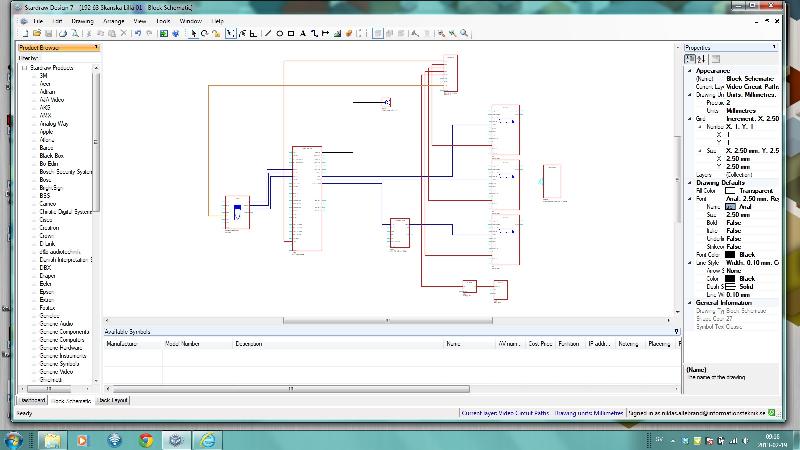
|
|
|
|
|
Rob Robinson
|
|
|
Group: Administrators
Posts: 2.4K,
Visits: 9.1K
|
Hi Niklas,
We have emailed you with a suggested procedure to resolve this - please check your email Inbox.
Kind regards,
Rob Robinson
Stardraw.com
|
|
|
|
|
HeliosAAV
|
|
|
Group: Forum Members
Posts: 6,
Visits: 22
|
I too am receiving this error, could you make the resolution public?
Many thanks
Alan
|
|
|
|
|
Rob Robinson
|
|
|
Group: Administrators
Posts: 2.4K,
Visits: 9.1K
|
Hi Alan,
The resolution to the initial post is not something that can be implemented publically but requires a custom file to be built to replace that specific user's UDP file.
Also, there are several possible causes for a failure to see one's UDPs, e.g.if you are not logged in, if you are logged in as a different user, or have logged in to a different machine without the UDP synch service being active (or if that machine is offline).
Even if you think you are seeing something similar, it does not mean that the issue (or the solution) is the same.
Can you describe exactly what you see and include a screengrab? Thanks.
Kind regards,
Rob Robinson
Stardraw.com
|
|
|
|
|
HeliosAAV
|
|
|
Group: Forum Members
Posts: 6,
Visits: 22
|
Hi Rob, Understand, thanks for your update. We have our UDP service active, and have ensured that the library on our main PC used for design work has successfully been uploaded and synchronised with the cloud. I have logged in under the same account on another laptop and wished to utilise the same UDP's. As Lillen730, I too can view products from my product library, and see them in my selection list in the products page if was to double click a UDP, however, I cannot view the products in my Product browser in the block schematic drawing page, nor in the available symbols list at the bottom of the screen. Thanks for your input. Alan 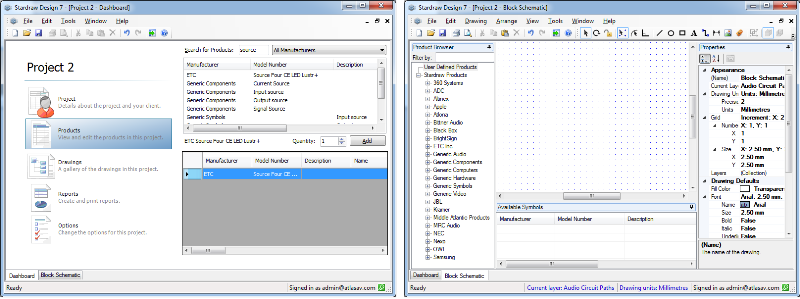
|
|
|
|
|
Rob Robinson
|
|
|
Group: Administrators
Posts: 2.4K,
Visits: 9.1K
|
Hi Alan,
I suspect that the UDP Synch has not completed; you've got the Product Records (Manufacturer, Model Number etc) but not the symbol records which can take some time to download because there's a lot more data.
Please restart SD7 and do nothing for a few minutes - in the Status Bar (bottom left of the application window) you will see UDP and Synchronization progress; do not open a project or drawing view until you have seen Synchronization Complete and then Ready in the Status Bar.
Does this solve the problem?
Kind regards,
Rob Robinson
Stardraw.com
|
|
|
|
|
HeliosAAV
|
|
|
Group: Forum Members
Posts: 6,
Visits: 22
|
Hi Rob,
I have left the main PC which holds our UDP's upload for an hour to ensure it fully uploaded (It stated that the upload was complete only a few moments after starting up). I have since run my laptop for an 1/2 hour (although once again its has said UDP synchronisation complete after only a few seconds) and it unfortunately still is showing the same situation.
Thanks
Alan
|
|
|
|
|
Rob Robinson
|
|
|
Group: Administrators
Posts: 2.4K,
Visits: 9.1K
|
Hi Alan, 1. Close StardrawDesign 7 and, using Windows Explorer, go to “C:\Users\[your username]\AppData\Roaming\Stardraw.com Ltd\Stardraw Design 7\1.0.0.0. 2. You will see a file with a long numeric filename and a .sdf extension. Rename this file by adding “.bak” so that, as an example,“556c62ed-1537-4721-a796-7a203dea4287.sdf” becomes“556c62ed-1537-4721-a796-7a203dea4287.sdf.bak”. The file contains the UDPs that are on the current machine, so it will be safer to rename it than delete it. 3. Start SD7 and allow Synchronization to complete. The UDPs stored on the Cloud should now appear on the current machine. Please let me know how you get on and if you continue to experience any problems.
Kind regards, Rob Robinson Stardraw.com
|
|
|
|
|
HeliosAAV
|
|
|
Group: Forum Members
Posts: 6,
Visits: 22
|
Hi Rob,
I have completed the suggested and unfortunately I am still in the same situation, what would be the next best step.
Many thanks
Alan
|
|
|
|
|
Rob Robinson
|
|
|
Group: Administrators
Posts: 2.4K,
Visits: 9.1K
|
Hi Alan,
Can you confirm that your dongle is plugged into and recognised by the new machine? What dongle number is shown when you select Help | About Stardraw Design 7?
[Edit] Also, can you confirm that there IS a symbol for the ETC Source 4 UDP that you showed in your screengrab? i.e. you created a symbol for it on the other machine?
Kind regards,
Rob Robinson
Stardraw.com
|
|
|
|