By H.Ketting - 4/29/2013 2:44:48 PM
Is it possible to add extra tekst in a product on a block schematic drawing to know with product is witch??
We use a lot of the same components / products in an installation and it would be nice to show an extra tekst in the 'product'' telling us witch item is for what puprpose.
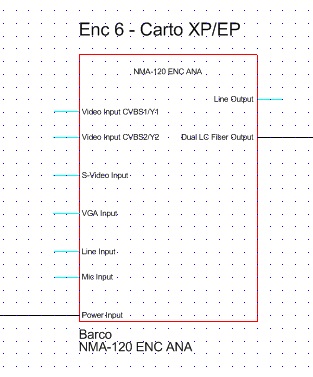
I can do something like this with an extra label / Tekst-field, but it would be nicer to have this tekst-field incorporated directly into the product. I found the attributes of the products, but they do not show on the block schematic drawing:The tekst below "Enc - Carto XP/EP" is a tekst-field and is no part of the product. Moving one or the other does not move the other. Except when I group them. But it would be nice to have this tekst to appear into the product itself as part of the product.
Can this be done?? and if yes: how can i do this
|
By Rob Robinson - 4/30/2013 11:45:04 AM
You can edit and add any information to User Defined Products (UDPs). The movie "Adding New Products" covers creation and editing of UDP symbols and you can view it here: http://www.stardraw.com/products/stardrawdesign7/movies.asp
Once a UDP has been created you can rightclick on it in the Product Browser, choose Edit Symbols, and amend the symbol in any way you like - this is covered at about 6m 36s into the movie.
Currently it is not possible to associate a text field with an Attribute, but you can edit a text field in a symbol in your drawing using the Unlock cursor.
I hope this is helpful.
|
By H.Ketting - 5/1/2013 3:21:08 PM
Rob,
thanks for the answer; I had seen the video, but changing the product or making a new one for each occurence does give a lot of products in stead of one with a different title / description.
Your tip on the 'unlock' cursor does do the trick for us I guess. Thanks!
|
|