Hi Rob,
You guys are going to hate me for this post !
As I went through the forum yesterday, I pay particular attention to a post of zuk123 available here: http://forums.stardraw.com/Topic9157.aspx
Although I absolutely don’t share is point of view about the ready-made cables being products (probably because I’ve been a cable hair dresser during more than 15 years in my professional life and that the crap Chinese made cable assemblies largely contribute to the extinction of that activity) I must admit that it is time to have a real improvement in the way Stardraw handles cables.
I think we had the same conversation with each and every update I bought since ShuttleCADback in 94 or so.
In a fixed installation, you do make extensive use of different type of cables and you look at standardize the range of what you use mainly for stock reason.
Also when possible you combine several cables into a multicore to reduce the number of cables you pull.
Almost 20 years after, we are still nowhere with this! Yes the cables are easier to draw, they move along with parts, but these things are in place since years. Anyway this is not the topic.
Cable report is a super tools for installer and as such I paid particular attention to this part in my discovering of SD7.
We now have a beautiful excel sheet with up to 43 attributes being referenced in it. A dream right?
Well not exactly!
What is the purpose of this list?
1 pull all your cables: well you are nowhere near to what you need here. The first issue being that this list hasn’t got a clue about your intention to combine lines into multicores so all this is a manual process, and obviously all the effort being done to do this in Excel are not reflected on your drawing ever!
2 extract a list of the cable types you need to order…
3 count your connectors needs: Well here is the example I go out of a mixer (fem XLR on the cable) into an amp (male XLR on thecable) and the cable list has got absolutely no clue of the type of connectorto be used!
4 Produce the information to be printed on labels. Thanks god, Label printing softwares are really helping here with not too much headache. They are able to combine onto the same label the information included in label (SPK001) with the amplifier model LA4 and its number created by the user! And the start port in order to get : SPK001 - LA4 – 1 - Out ½
All, I said all of the additional work can be avoided by creating a proper cable selection flow.
I spend a bit of time trying to draw down the decision process that would need to be implemented in SDx (hopefully 7) to make what is likely to be the dream of us all.
The flow is visible here below and I attached a PDF version for a better quality.
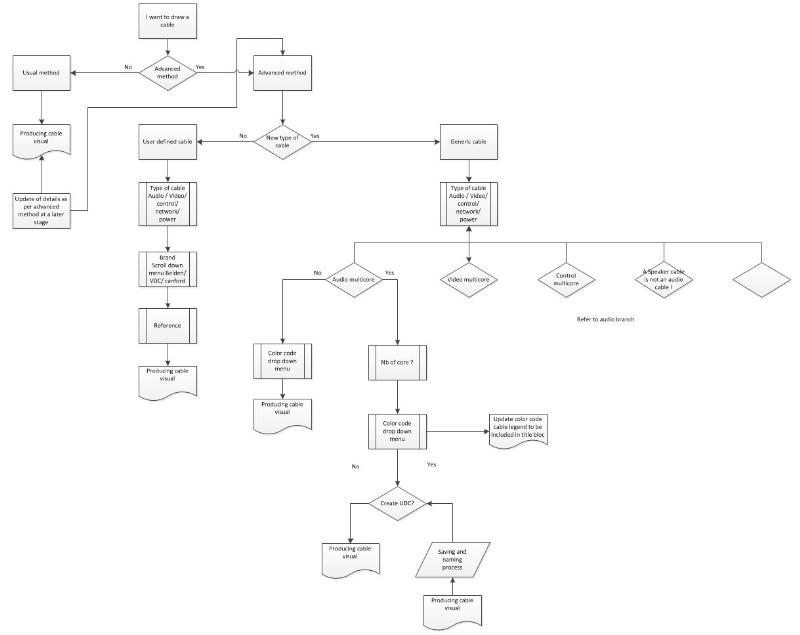
As you can notice, when ready to draw a cable, you can choose to do it the traditional way for fast production of visual or to go through the advanced method.
Note that you are able to improve the quality of your drawing by providing more precise information about the cable to be used at a later stage if you originally selected the usual method.
With the advanced method, you can either select the type of cable from a library that is in all way similar to the product library or to work out of a generic custommade on the fly cable that you can obviously save in the library for future use.
I bet my ass in the most complicated installation you don’t use more than 20 types of cables and if you are a smart installer, they are constantly stocked and available.
The cables are color coded by default to increase the visibility of the drawings.
Ultimately this process would provide an accurate drawing of your cable split in the bloc schematic environment as visible here below.
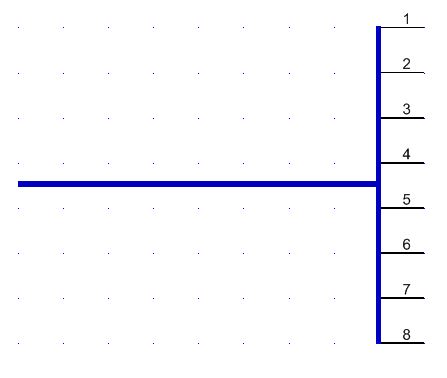
The cable is one (identified along with the first pair for instance), and to each pair would correspond a line with all the details as per the current list but no cable. Does that make sense?
I feel I laid here the base of a community brainstorming that could lead to a major update of our favorite installation drawing software.
I would be really pleased to have all the inputs of other users about this post.
Don’t just read it, contribute!
Thanks
Christian
Christian Delvaux
Back in Belgium !