By zuk123 - 2/23/2012 3:10:35 AM
Any way to set the default location of the label? It is too near the end, and is obscured by the arrowhead.
I realize you can move them by clicking and dragging, but that is more work for something that is supposed to SAVE time.
Any way to change the default cable label font and size? Changing the defaults for the drawing only seems to affect text, not labels.
zuk
|
By zuk123 - 2/23/2012 3:31:01 AM
Further weirdness, when you move a label near the end of the cable, you can't put it back where it started.
They start VERY near, almost touching the line of the cable, but when you move them, they won't go back to that spot, instead they have more space between the cable line and the label.
This is a small thing, but it makes the labeling inconsistent between any that have moved, and those that didn't.
It would be my preference to have a little more space between the label and the line. With the label touching the line it is very hard to read.
I'm not really interested in touching every single cable label, but that is what I've had to do to get readability. Manually changing the font size for each label will add huge buckets of suck to this process too.
zuk
|
By zuk123 - 2/23/2012 4:13:09 AM
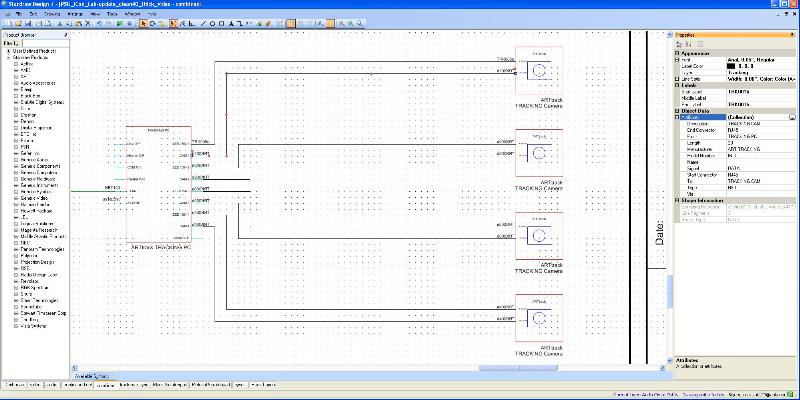
And I've got cable labels that are mirrored on a mirrored symbol. Note that the labels were added long after the symbols were mirrored.
I can't imaging a case where you would WANT text to be backwards and reversed. Text on the symbols themselves is correct.
Update>> redrawing the cables allows the label to display correctly, but it means re-entering the attributes. More time gone...
zuk
|
By Rob Robinson - 2/23/2012 11:56:36 AM
Hi Zuk,
Currently cable label location and font defaults are not exposed so you can't change them.
Regarding moving cable labels, you are probably working with Snap to Grid on, with Number of Snaps set to 1 in X and Y. This is what makes it so easy to move around and connect symbols, cables etc. If you want to move things in increments finer than 1 gridpoint, just increase the Number of Snaps. You'll find that 5 is the value that allows you to re-position a cable label to its original location.
If you do need to change cable label height, you can do this post-creation by selecting the cables in question and setting a new font height across that selection in a single action.
We have designed the Cable Label defaults to meet the majority of cases and provide the most workable solution with the minimum of user input in most scenarios. For example:
- The text height is less than 1 gridpoint to prevent overlap with adjacent IOs and cables.
- The text has a height and position so that it is closer to the cable it labels than to any other cable.
- The text is offset so that it is not overlapped by or overlapping the cable it labels or the symbol to which that cable is connected.
Of course, these standards are a compromise between ease of use and flexibility, amongst other things: they deal with most scenarios well, but cannot deal with every possible scenario, particularly if people operate outside of expected parameters.
Regarding mirroring, we have reproduced the effect that if you mirror a selection of symbols and cables then cable labels can appear aligned in unexpected ways. Frankly, this scenario was never tested: it breaks all of the normal working practices (e.g. signal flow is left to right, inputs are on the left and outputs are on the right) so is one of those cases that are 'outside normal operational parameters'. We will investigate.
|
By zuk123 - 2/23/2012 3:35:34 PM
Hey Rob, the symbols in this case were originally drawn based off the generic pc, but represent a whole freestanding system. It makes sense to have the camera/strobe units 'coming from' the pc as that is how they physically connect. The pc runs 'headless' and so doesn't have any keys/mouse/monitors. So the whole collection is really one symbol (tracking system) and it makes sense graphically in the drawing.
Conventions are great, hidden assumptions are not.
After all, the left to right, in to out paradigm really only makes sense if you are culturally conditioned to read left to right. I'm pretty sure that it would not be as natural to someone using a writing system that is right to left or top to bottom. Maybe someone else on the forum from one of those cultures could comment?
So, thanks for the info on the snap settings. I found that I had to move almost every single end label for readability. About 1 in 8 were past the end the line and overlapped symbols. Many were touching the symbol either on the left or right (ie. too close to the end of the cable line.) Many were touching the cable line and needed vertical separation. And you neatly sidestepped the "overlaps the arrowhead" part.
Changing the font size for each cable individually is a non-starter. It takes 3 clicks and then typing for each line. Some could be multiple selections, but still a lot of work. I have 130+ cables in just this simple little system.
Regarding the default size, it could still be bigger and fit within the one grid limit. And almost ever symbol I've seen has 2 grid spacing for connection points. Ultimately if they are not readable, then there is no point in doing them AT ALL.
Finally, it seems like they fixed the issue raised in another thread of the cable tool incrementing when the user clicks on the drawing to zoom by just not allowing clicks anywhere that isn't a cable. While that does fix the one issue, it means you can't zoom at all now, since the cable dialog box has focus, the scroll wheel doesn't zoom the drawing. There are other ways to navigate, I know. But it is another point of friction in working with SD. There are a LOT of points of friction.
Thanks,
z
|
By Rob Robinson - 2/24/2012 8:04:02 PM
Hi Zuk,
Thanks for alerting us to the Cable Label mode zoom issue - this was a regression and has now been fixed.
We are also looking into exposing additional Cable Label properties and will post back here with any news.
|
|