By TomK - 9/17/2025 5:31:33 AM
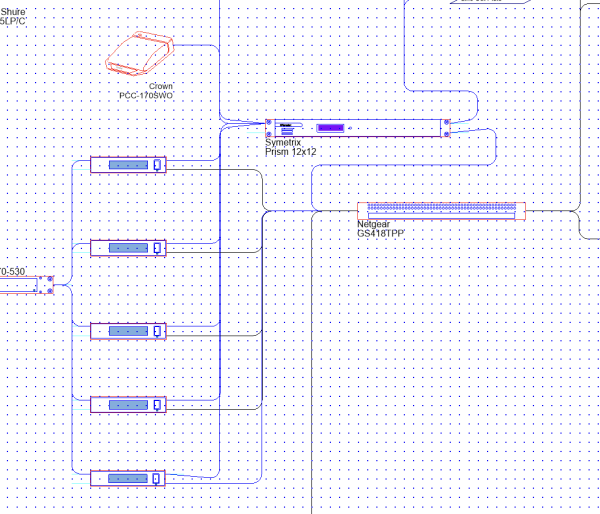
Why are my products and cables not properly aligned?
Every product is from the Stardraw products Browser data base. None of my products have been edited via user defined products subsystem.
Even the vertical cables from the Shure receivers to the Symetrix DSP are just off alignment a bit.
All products have been added with snap to grid on.
Yes I have tried the align to symbol origins. This does not fix this issue.
What can I do? This has become very frustrating.
|
By Rob Robinson - 9/17/2025 6:15:19 AM
Hi Tom,
In Pictorial Schematics, some products might have IO stubs that are halfway between gridpoints vertically. To put these IOs on gridpoints and/or ensure cable segments are horizontal just change the Number of Snaps in Y to 2, allowing things to snap halfway between gridpoints vertically.
- Click anywhere on the drawing to have the Properties Grid show the Document Properties.
- Under Appearance | Grid | Number of Snaps set the Y value to 2.
I hope this is helpful.
|
By TomK - 9/17/2025 6:31:50 AM
Ok Great
That seemed to fix the issue.
Thanks!
|
By TomK - 9/17/2025 6:53:22 AM
@Rob Robinson., A few questions
So after I changed the Y snaps to 2, I did a select all, then selected align to symbol origins. That seemed to put all the products in the proper alignment. But did nothing to the wires.
For each wire out of alignment, I selected each wire and aligned each to the grid.
1. Is that the correct workflow for correcting the products and wires?
2 Is there a better workflow? Especially for realigning the wires?
3 Should I by default whenever I start I new pictorial drawing, change the Y snaps to 2?
4 Should Stardraw change the default Y snaps to 2 within the software?
Thanks
|
By Rob Robinson - 9/17/2025 11:53:53 AM
Hi Tom,
In this case using Align to Grid | Symbol Origins will be ineffective because a) your symbols are already on the grid and b) number of snaps has no effect on this command.
Really it's just a case of manually moving symbols and cable nodes so that you get the alignment you want relative to the grid; you could leave the symbols where they are and just tweak the affected cable nodes, or move anything that causes cable endpoints to be between gridpoints half a gridspace up or down to get things where you want them to be.
Yes, you could create a User Template that has No. of Snaps Y=2 and use that in the future (use File | Save as Template for this).
The real issue is that some symbols offer IO stubs that are by default halfway between gridpoints and this is a legacy effect.
|
By Rob Robinson - 9/17/2025 3:13:30 PM
Hi Tom,
One further thing that just sprang to mind: I think you've only encountered this as a problem because you are drawing your Cables using the click-click-click method.
If you click and drag to create Cables then you'll find that all Cable segments will be perfectly horizontal or vertical, even where IO stubs are not vertically aligned to a gridpoint, because the always-on Snap to Connector modifier takes precedence over Snap to Grid when you are near a connection point.
I hope this helps.
|