By jelte - 1/17/2020 1:33:36 PM
Hi,
I'm getting a lot of 2d dwg plans for big projects, with a lot of layers in it , and i need switch a lot between them displayed or not.
And to do so every time i have to open the layer windows via the menu with the mouse, change displayed, and close via the menu. (no shortcut either )
Could it be possible the layer windows becomes a window or side tab which you can keep open, to display and lock layers faster. ( same idea as the Autocad viewer also has)
Regards,
Jelte
|
By Rob Robinson - 1/17/2020 1:38:37 PM
Hi Jelte,
Thanks for your post - yes, we hope to be able to make the Layers dialog 'modeless' (i.e. it can be on view all the time) in the next version.
In the meantime you might find it marginally quicker to open the Layers dialog using the "Current Layer:..." hyperlink at the bottom of the drawing window.
|
By jelte - 1/17/2020 1:50:05 PM
+xHi Jelte, Thanks for your post - yes, we hope to be able to make the Layers dialog 'modeless' (i.e. it can be on view all the time) in the next version. In the meantime you might find it marginally quicker to open the Layers dialog using the "Current Layer:..." hyperlink at the bottom of the drawing window.
Hi Rob,
Great, can't wait for the next version........ one other option instead of the windows, would be able to switch them on and of in the properties by clicking the light bulb on the layers ;-)
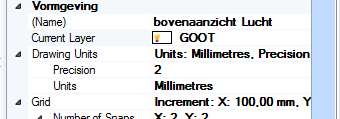
Thanks for the hyperlink tip, didn't know that. This saves me some miles and clicks for now.
Regadrs
Jelte
|
|