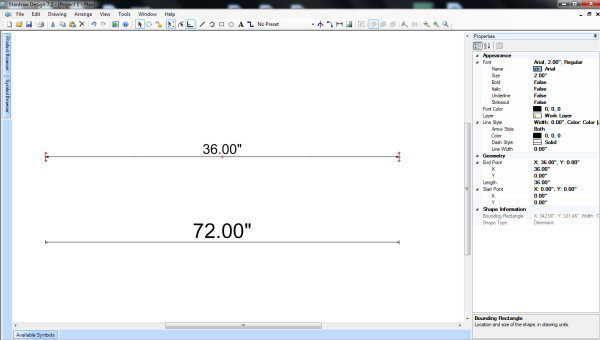
+xAfter I scale an object, via 'Arrange'-'Scale', the properties of the object don't reflect the scaling. So a 36" line, scaled 200%, is now 72" long. But all the properties of the line still have the original dimensions. Is this correct behavior? See attached pic. The bottom dimension line was drawn after the top line was scaled.
Thanks!
Josh,
Yes, this is correct behaviour. A Scale is a type of Transformation. Others include Translation and Rotation. If you Rotated a 36" Line by 90 degrees, it would still be 36" long - The same applies to Translating it.
This is a complicated subject but the coordinates are in child/model space and it has a transformation matrix that transforms the child/model space into world space. After this, there is another View Matrix that transforms the World Space into View Space (related to where on the drawing you are and how far in you are zoomed) and a final one that transforms View Space into Device Space (pixels on your screen).
All these transformations take place every time you redraw your screen or move about the drawing. The Child co-ordinates and dimensions do not change. This is the behaviour you are seeing. If you want to make the line twice as long, I would recommend typing in the length that you want the line to be from the Property Grid when you have the Line selected.
I hope this makes sense.